Vodafone Zuhause Talk&Web-Box Firmware v2.63

Thanks to markmoses for pointing out the firmware upgrade for Vodafone Zuhause Talk & Web 3g router. Firmware v2.63 was released on 20 Sept 2007 as a maintenance release. Unfortunately, Vodafone Support did not mention the purpose of the release. I personally have not tested this firmware yet. My unit was upgraded to v2.50 from v2.37 .
To download the firmware, click here. Please try it on your own risk. The firmware upgrade is irreversible.
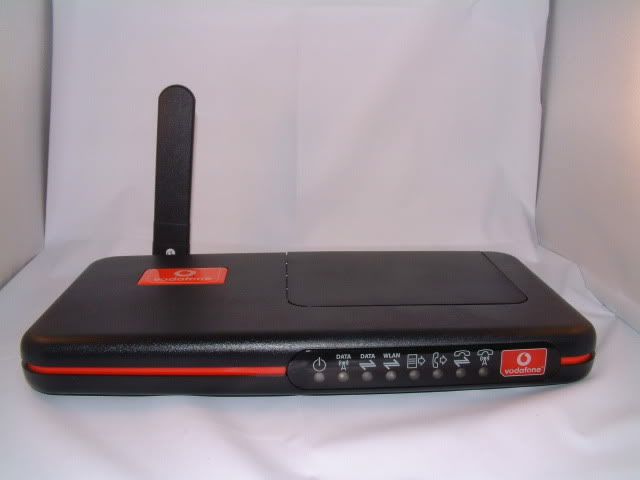
If anyone tried v2.63, please share with us what’s the changes in this new firmware. Thanks
The firmware is ok, but still not auto reconnect to network.
i see…
they most probably not planning to implement the auto connect features anymore.
Do you notice any difference with the firmware?
I just bought one Vodafone Zuhause Talk&Web-Box and I have just also subscribe a new Celcom Data Line(Unlimited Access). I tried to get Celcom Salesman to advise me on the setting and config, unfortunately they have no idea.
Do anybody have step by step guide to config this rounter?
Appreciated!
hie .. the settings are quite easy actually…
once u log into the router switch the language to English. Then look for theSetup Wizard…
for the APN just key in celcom3G
leave the username and password blank.
speed is 384
i have a problem with my zuhause talk&web-box. it keeps dropping me from the internet about every 10 min and will not reconnect until i cold boot. any ideas?
Im having the same probs aswell Garth! Feel wanna throw my unit from window whenever it show ‘ attaching to network’….
I feel your pain. I’m stuck on an island and can not get back to civilization for a few more weeks. Noone has any answers?
steph upgrade firmware if that not fix it take back and get new one is what i found out. where you using yours by the way? I am on tioman so it could be where i am. you?
http://rs20.rapidshare.com/files/63687490/tuwnovatel_fw_v2_63.img
still no help. always getting dropped and it says attaching to network.
anyone one know the pin code for the Vodafone talk&web-box??
no pin code buddy…if u experiencing that problem try replace ur simcard..everything will be fine and for those who plan to buy this router…PLEASEEEEEE change ur mind! It not worth it…i had mine now and feel like throw it out..keep on dropping for every 5 min…but i know how to handle it haha
you know how to handle it? please share.
Besides, after I reboot the device for several times, now I am not even able to access it thru the browser. Anyone can help?
yes kenny.. do share if you don’t mind. Purpose of this post is to share whatever we know about this router. Since it’s in German, not many people can get use to it.
Kai, have you tried reseting the router? What firmware are you using? Do you know?
Ya, I reset using the rear reset button. Doesn’t work. And I press longer for the reset button, the power and data lights start switch blinking and it takes never end. What should I do? I once upgrade the firmware to 2.63. Please help.
Solution for Zuhause Disconnect Problem.
Try at your own risk
I just bought my new zuhause talk&web and subscribe to celcom broadband. The problem is it always disconnected and show “attaching to network”.
I’ve tried to upgrade the router firmware to 2.50 & 2.63 but the problem still persist.
Finally I’ve found the solution!!! You have to upgrade the 3G card merlin U630 firmware instead! I’ve just upgrade the firmware to 14.5 and everything work fine. Not more irritating “attaching to network” anymore. I’ve been connected for few hours without interruption. Go to
http://www.vodafone.co.nz/personal/plans-services/3G-broadband/latest-downloads/firmware-releases/download-fw-4.jsp
to download the firmware.
The only problem is you have to open your zuhause talk&web (this might void your warranty) and take out your 3G card inside. Then have to use notebook to upgrade the firmware.. Good luck
Does anyone have problem with zuhause talk&web on the phone module, my unit is working fine when I just bought it but it does not function after 2 months just keep on giving a humming noise. No dial tone but the led light is green in color. Any one have spare unit that you like to sell?
if i upgrade like ThienLS said, it will change the firmware interface?..
it have function auro connection or not.. tq..
Dean,
Upgrading the 3G card firmware only solve the “always disconnected problem”. The router interface still the same. Still no auto connection. Anyway, After upgrading firmware, so far i only encounter 1 disconnect situation. Most of the time connected even open for few days!!!
ThienLS….how to pull that 3g card inside? ive open the unit and found that the card seems to be solid and permenently attach to te unit.. Helppppp!!! cant take it anymore! anyone succeed upgrading their unit according to ThienLS method????
can anyone help me on setting my ause router ? maill me eugenewyh700 at hotmail
after i upgrade the Merlin U630’s firmware to 14.5 and everything work fine. Not more irritating “attaching to network” anymore.
But I found that some notebook have this problem for Merlin U630 card. Error code 10, and cannot detect the device. You guys need to use this version ‘s driver to install ..NwtDriverInst_V1.2.1.1
http://www.novatelwireless.com/support/files/TSBUMTS_002B_EC12_.pdf
downlaod the driver which available in the PDF file. i used Celcom 3G, Malaysia.
one more thing, can i use U740 to replace U630 card inside to get higher bandwidth???
hi all.. i’ve just bought zuhause talk&web-box 2 days ago. My location is in Jakarta,Indonesia. At the first it was just awesome! Great speed using UMTS network at 384kpbs. But after yesterday..suddenly it changed connect to GPRS network with green blinking light on data panel. I’ve checked the connection setting at 384kbps. I’ve rebooted the router but it still won’t connect to UMTS like before. I also try the simcard using Option 3G MAX PCMCIA Card to my laptop and it was perfectly connected to 3G network. I assume the simcard is okay. This really makes me stress. Anyone can help ?
Thanks
Direct link to the firmware is http://www.vodafone.de/downloadarea/tuwnovatel_fw_v2_63.img
Tq.
using U630 firmware 14.5 make my router connection time out just 1 minute after it connected. So I upgrade to firmware 2.0 and now it’s connection better than before. You can download U630 firmware 2.0 at http://www.o2.co.uk/assets/O2HybridNav/Static-files/DataCardUpdatesImages/SoftwareUpdates/NVTL_FUU_630_20.0.exe
hi all,
I still cannot upgrade my u630 firmware to 14.5
It says “Comport error”
Maybe the problem exist because I cannot install driver that come with
http://www.novatelwireless.com/support/files/TSBUMTS_002B_EC12_.pdf.
My Laptop recognise my u630 as Generic “PC Standart Modem” not as u630.
If i run the upgrader while u630 recognised as PC standart modem ,
the error appear.
Does anyone can help me solve my problem ?
I’m sorry if i’m only a beginner and not good in english.
you have to download the actual drivers for the merlin card. will not work when it says it’s a generic card. email me at garthak[at]excite.com.
Hello… Does anyone know how to use zuhause web&talk as print server? I have Epson tx101. I’ve searched throughout the web.. and found nothing about managing print server capability. Please advice.
Thank you.